The Company Words Keep: How Word2Vec Learns Word Embeddings
How Word2Vec Learns Word Embeddings
In many natural language processing (NLP) tasks, we use pre-trained word embeddings like Word2Vec, GloVe, or fastText. These tools are powerful, but they often feel like magic. We feed in words, and out come numbers that somehow capture meaning. But how does this work? What are these numbers? And can we make them ourselves? We'll build intuition for how Skip-gram learns vectors with a small, hand-calculated example. Some of the vector movement below is a teaching analogy; later, we will show how the real Word2Vec update differs. A follow-up article explores a custom, value-aware embedding idea, which would need its own evaluation before claiming it works better than general-purpose embeddings.
By working through the training idea, we'll see:
- The mathematical principles that transform words into vector representations
- How context windows capture semantic relationships between words
- The training process that optimizes these representations
The goal is to understand the basic mechanics behind one popular embedding method. This walkthrough is conceptual: it does not implement or evaluate a complete Word2Vec system.
Understanding Words by Their Company
Imagine trying to understand a conversation by only looking at the words without any context - it would be really hard to know what someone is talking about. Word2Vec builds on this fundamental insight: a word's meaning emerges from the company it keeps. This approach mirrors how we naturally learn language. When a child hears an unfamiliar word like "beach," they don't look it up in a dictionary. Instead, they notice it appears alongside words like "sand," "waves," "sunscreen," and "swim." These associations create a mental network that gives "beach" its meaning.
What Are Word Embeddings?
Word embeddings are a clever way to translate words into numbers that computers can work with. Instead of seeing "dog" as just a word, computers see it as something like [0.2, 0.5, -0.1]. This simple change makes a big difference!
These number lists are called vectors. After training, words used in similar ways often have similar vectors, though similarity depends on how we compare them. Cosine similarity is commonly used to find words with similar contexts. The geometry is useful, but it is not a literal map of human-defined meanings.
Understanding Vectors and Dimensions
A vector is just a list of numbers. Think of it like coordinates on a map:
- A 2D map uses two numbers:
[x, y](like[3, 5]means 3 steps east, 5 steps north) - A 3D space uses three numbers:
[x, y, z] - Word vectors typically use 100-300 numbers (dimensions)
Using many dimensions lets the model represent patterns in how words are used. But a dimension usually does not correspond neatly to a human concept like "outdoorsy" or "technological." Meaningful patterns are spread across combinations of dimensions.
How Word2Vec Works
Word2Vec learns statistical patterns from words that occur near one another. Words used in similar contexts often end up with similar input vectors. People commonly compare those vectors with cosine similarity. Some trained embeddings also show useful arithmetic patterns, but these are tendencies learned from data, not guaranteed rules or dictionary definitions.
Why This Matters
Word embeddings give language systems a useful numerical representation of words. They can help with tasks such as search, translation, and recommendation, but an embedding by itself does not understand language or reason about information.
Word embeddings were a breakthrough that helped make technology feel more intuitive and human-like in how it handles language.
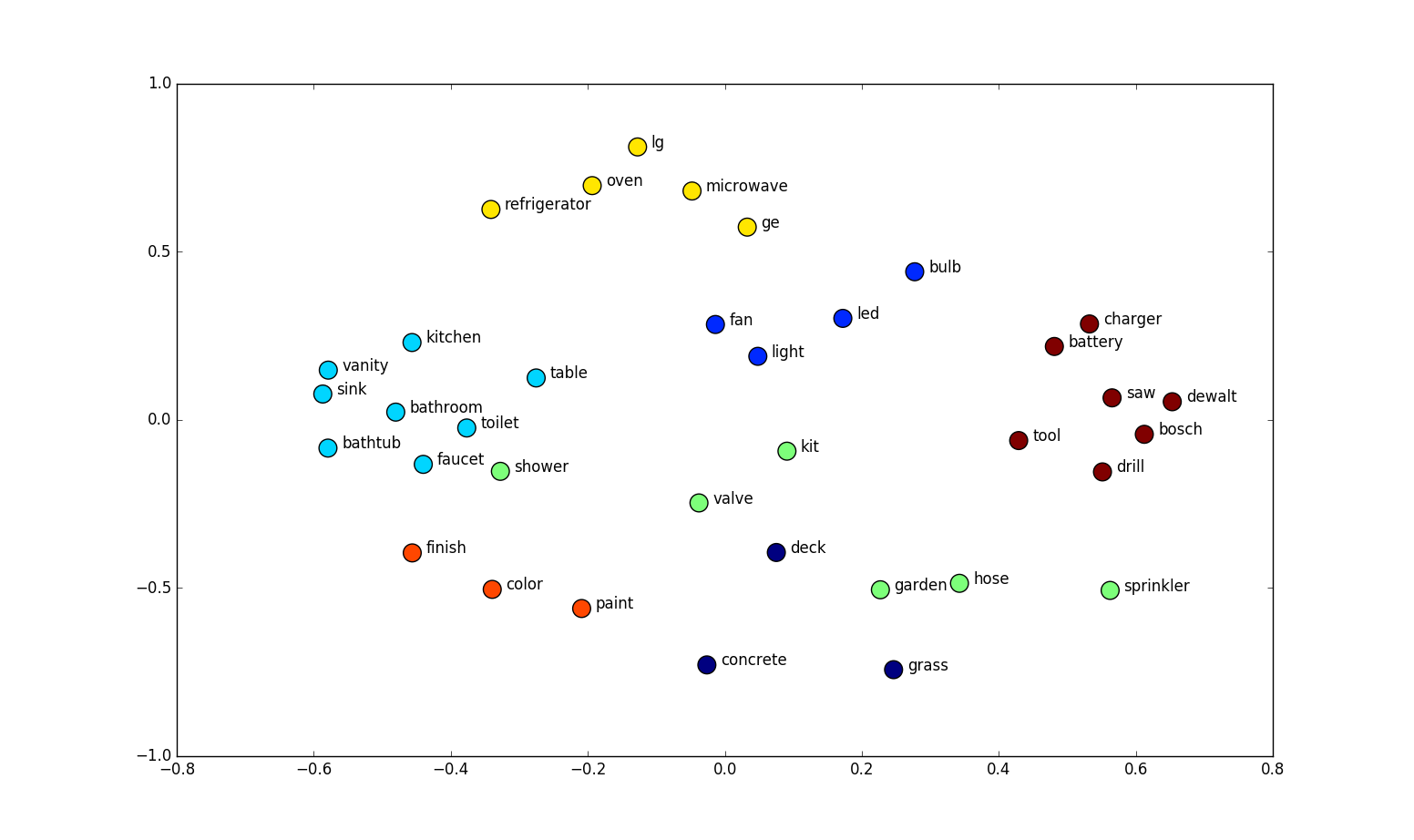
Word Embedding Visualization Analysis
The image displays a 2D scatter plot where words are positioned based on their semantic relationships. These positions derive from word embeddings that capture meaning based on context.
Key Word Clusters:
- Bathroom Fixtures: vanity, sink, toilet, bathtub, shower - grouped by their bathroom context
- Lighting: fan, light, bulb, led - connected through home lighting usage
- Tools: saw, dewalt, bosch, drill - associated with construction and hardware
- Home Finishing: finish, color, paint - related to decoration and renovation
- Outdoor/Gardening: deck, garden, hose, sprinkler, concrete - linked by outdoor usage
- Kitchen Appliances: oven, microwave, refrigerator, lg, ge - grouped as household appliances
This visualization demonstrates how word embeddings capture semantic relationships - nearby words share similar contexts, while distant words differ significantly in usage. The 2D representation efficiently reveals meaningful connections between terms that might appear in similar documents or discussions.
Word2Vec and the Skip-Gram Model: Core Concepts
Word2Vec learns word vectors from text. It has two common architectures: CBOW, which predicts a center word from nearby words, and Skip-gram, which predicts nearby words from a center word. This article focuses on Skip-gram.
How Skip-Gram Works
Skip-gram uses a window to decide which words near a center word count as real context pairs. The model keeps two vector tables: one for center (input) words and one for context (output) words. A pair is scored by taking the dot product of its two vectors.
In the version we focus on, negative sampling adds a few noise words to each real pair. Training raises the scores of real center-context pairs and lowers the scores of sampled noise pairs. It does not directly pull two word vectors together by measuring their distance. After training, input vectors for words with similar contexts often end up similar, which is why they can be useful as word embeddings.
Positive Context Pairs and Negative Samples
A window around a center word gives us positive pairs: the center word and a nearby context word that really appeared in that position. For example, with a window of two, "dogs" in our sentence has "and," "Cats," "are," and "popular" as positive contexts.
Skip-gram with negative sampling also trains on noise pairs. For each positive pair, it samples a few words from a frequency-based noise distribution. The model learns to score the real pair higher than these sampled alternatives.
A noise pair is a training contrast, not proof that two words are unrelated or could never appear together. Words outside the current window are not automatically negatives; a word becomes a negative example only when it is sampled as noise for that training step. The original Word2Vec method uses a word-frequency distribution raised to the 3/4 power for these samples.
Positive pairs alone would give the model no contrastive signal for telling observed contexts from other word pairs. Noise samples provide that contrast. Together, they teach the model to raise the dot-product score of a real pair and lower the score of a sampled noise pair. The update acts on pair scores; it does not directly shorten or lengthen the distance between the two vectors.
Skip-gram Training Pairs
Using a window size of 2 (looking at 2 words on each side of the target word), here are all the positive training pairs generated:
| Window | Target Word (Main) | Context Word | Label |
|---|---|---|---|
| [Cats, and, ...] | Cats | and | 1 |
| [Cats, and, ...] | Cats | dogs | 1 |
| [..., Cats, and, dogs, ...] | and | Cats | 1 |
| [..., Cats, and, dogs, ...] | and | dogs | 1 |
| [..., Cats, and, dogs, ...] | and | are | 1 |
| [..., and, dogs, are, ...] | dogs | and | 1 |
| [..., and, dogs, are, ...] | dogs | Cats | 1 |
| [..., and, dogs, are, ...] | dogs | popular | 1 |
| [..., dogs, are, popular, ...] | are | dogs | 1 |
| [..., dogs, are, popular, ...] | are | and | 1 |
| [..., dogs, are, popular, ...] | are | pets | 1 |
| [..., are, popular, pets, ...] | popular | are | 1 |
| [..., are, popular, pets, ...] | popular | dogs | 1 |
| [..., are, popular, pets, ...] | popular | while | 1 |
| [..., popular, pets, while, ...] | pets | popular | 1 |
| [..., popular, pets, while, ...] | pets | are | 1 |
| [..., popular, pets, while, ...] | pets | fish | 1 |
| [..., pets, while, fish, ...] | while | pets | 1 |
| [..., pets, while, fish, ...] | while | popular | 1 |
| [..., pets, while, fish, ...] | while | require | 1 |
| [..., while, fish, require, ...] | fish | while | 1 |
| [..., while, fish, require, ...] | fish | pets | 1 |
| [..., while, fish, require, ...] | fish | less | 1 |
| [..., fish, require, less, ...] | require | fish | 1 |
| [..., fish, require, less, ...] | require | while | 1 |
| [..., fish, require, less, ...] | require | attention | 1 |
| [..., require, less, attention] | less | require | 1 |
| [..., require, less, attention] | less | fish | 1 |
| [..., require, less, attention] | less | attention | 1 |
| [..., less, attention] | attention | less | 1 |
| [..., less, attention] | attention | require | 1 |
Negative Sampling Examples
For illustration, here are some possible noise samples for this tiny sentence. In real Word2Vec, noise words are drawn from a frequency-based distribution; being outside this particular window does not by itself make a word a negative example:
| Target Word (Main) | Context Word (Negative Sample) | Label |
|---|---|---|
| Cats | popular | 0 |
| Cats | fish | 0 |
| Cats | require | 0 |
| Cats | attention | 0 |
| dogs | fish | 0 |
| dogs | less | 0 |
| popular | Cats | 0 |
| popular | require | 0 |
| pets | Cats | 0 |
| pets | attention | 0 |
| fish | Cats | 0 |
| fish | dogs | 0 |
| fish | are | 0 |
| require | Cats | 0 |
| require | popular | 0 |
| attention | dogs | 0 |
| attention | popular | 0 |
| attention | while | 0 |
Complete Training Dataset (Sample)
Below is a small teaching sample combining positive pairs and selected noise pairs. It is not the full sampling procedure used in Word2Vec:
| Target Word (Main) | Context Word | Label |
|---|---|---|
| Cats | and | 1 |
| Cats | dogs | 1 |
| Cats | popular | 0 |
| Cats | fish | 0 |
| and | Cats | 1 |
| and | dogs | 1 |
| and | are | 1 |
| and | fish | 0 |
| dogs | and | 1 |
| dogs | Cats | 1 |
| dogs | popular | 1 |
| dogs | fish | 0 |
| are | dogs | 1 |
| are | and | 1 |
| are | pets | 1 |
| are | attention | 0 |
| popular | are | 1 |
| popular | dogs | 1 |
| popular | while | 1 |
| popular | Cats | 0 |
| pets | popular | 1 |
| pets | are | 1 |
| pets | fish | 1 |
| pets | Cats | 0 |
| while | pets | 1 |
| while | popular | 1 |
| while | require | 1 |
| while | and | 0 |
| fish | while | 1 |
| fish | pets | 1 |
| fish | less | 1 |
| fish | Cats | 0 |
| require | fish | 1 |
| require | while | 1 |
| require | attention | 1 |
| require | are | 0 |
| less | require | 1 |
| less | fish | 1 |
| less | attention | 1 |
| less | dogs | 0 |
| attention | less | 1 |
| attention | require | 1 |
| attention | popular | 0 |
Main and Context Embeddings
In our training data, each word can appear in two roles: as a main (target) word and as a context word. The Skip-gram algorithm assigns a separate vector (or embedding) for each role, so every word ends up with two sets of embeddings:
- Main (Target) Embeddings: Used when the word is the focus or target of prediction. Think of this as the "identity" of the word. At the end of training, these are the embeddings we use to represent each word.
- Context Embeddings: Used when the word appears as part of the surrounding context of a target word. These capture how the word is used alongside other words.
At the beginning of training, both sets of embeddings are randomly assigned. Throughout training, they are updated based on the word's usage in different contexts. As we continue, we'll explain in detail how these two embeddings work together and how they are updated. For now, just remember that each word starts with two random embeddings, and together they help capture the full picture of word usage.
Imagine we start with two word embeddings for two different words, both randomly initialized at the beginning. We denote the main embeddings as M and the context embeddings as C.
For example: For the word "Cats", its main embedding might be: M = [2,2]. For the word "dogs", its context embedding might be: C = [5, -4]
These values are chosen at random before training begins, and they will be updated as the model learns from the text.
Cats and Dog vector space viz
The pair (cats, dogs) is a positive example in our toy data. The model gives each word two vectors: a center vector and a context vector. For this example, let the center vector for "cats" be \(v=[2,2]\) and the context vector for "dogs" be \(u=[5,-4]\).
Dot Product: Scoring a Pair
The dot product gives a score for this center-context pair:
$$v\cdot u = (2\times5)+(2\times-4)=2$$
A larger score makes the model more likely to classify this pair as a real training pair rather than a sampled noise pair. This is a compatibility score for these two roles, not a general measure of how close two word vectors are.
The Sigmoid Score
The sigmoid turns the score into a number between 0 and 1:
$$\sigma(s)=\frac{1}{1+e^{-s}}$$
For a score of 2, \(\sigma(2)\approx0.88\). In the training setup, this says the model currently scores the pair as likely to be positive rather than sampled noise. It is not a literal probability that cats and dogs occur together in all language.
For a positive pair, the target label is \(y=1\); for a sampled noise pair, it is \(y=0\). The difference between the label and the sigmoid score tells the model which way to change the pair's score. We will use that error in the real update rule below.
A Geometric Picture for Intuition—not Word2Vec's Update
For a simple visual analogy, we can draw the gap from the main vector to the context vector. That gap is the difference vector:
$$\text{context}-\text{center}=[5,-4]-[2,2]=[3,-6]$$
In this teaching picture, we can imagine moving the two points toward each other for a positive example, or away from each other for a negative example. The next diagram shows that simplified movement.
This is only a geometric analogy. The difference vector is not the gradient used by Word2Vec, and the real algorithm does not update the vectors this way. Word2Vec changes the pair's dot-product score. The next section shows the actual update in a compact form.
Difference Vector in a Toy Geometry Example
The graph shows the geometric gap between the two points. In this simplified analogy, the arrow shows how one point could move toward the other. It is not the Word2Vec gradient. The real update depends on the other vector and on the label-minus-score error, as the next section explains.
The Error Used by the Real Pair-Training Rule
For a center-context pair, first compute its dot-product score and sigmoid score \(p\). Give it label \(y=1\) if it is a real nearby context pair, or \(y=0\) if it is a sampled noise pair. The error is:
$$e=y-p$$
For our positive example, \(p\approx0.88\), so \(e=1-0.88=0.12\). A positive error means the model should raise this pair's score. For a sampled noise pair, \(y=0\), so \(e=-p\): the model should lower its score.
This label-minus-score error is part of the real Word2Vec update. The geometric difference vector from the previous section is not.
What Word2Vec Actually Updates
Here is the key difference from the picture above. Word2Vec does not move the vectors along their difference. It changes the dot-product score for a pair. The update for each vector points along the other vector.
Let \(v\) be the center-word vector, \(u\) the context-word vector, \(p=\sigma(v\cdot u)\) the pair score, \(y\) its label, and \(\eta\) the learning rate. One gradient step is:
$$\begin{aligned} v &\leftarrow v + \eta(y-p)u,\\ u &\leftarrow u + \eta(y-p)v. \end{aligned}$$
Both updates use the vectors from before this step. In plain language:
- For a real context pair, \(y=1\), so the update raises its dot-product score.
- For a sampled noise pair, \(y=0\), so the update lowers its score.
For our example, \(v=[2,2]\), \(u=[5,-4]\), \(p\approx0.88\), and \(\eta=0.1\). For the positive pair, the center vector changes by about \([0.060,-0.048]\), while the context vector changes by about \([0.024,0.024]\). These differ from the earlier difference-vector arrows.
Actual Skip-gram with negative sampling repeats this simple rule for a real nearby context and for several sampled noise words. The original method draws noise words from a word-frequency distribution raised to the 3/4 power; it does not label every word outside the current window as negative. Mikolov et al. (2013) describe the objective.
The model directly learns which center-context pairs should receive higher or lower scores. It does not directly minimize the distance between two vectors. After training, input vectors for words used in similar contexts often become useful representations, but that similarity is an outcome of training, not the update formula itself.
Toy Vector Movement (Not the Word2Vec Update)
This plot visualizes the simplified geometric analogy only. These arrows are not the Word2Vec training updates.
-
M (Main Vector):
The original main embedding is shown at the point (2, 2) and labeled "M" in blue. -
C (Context Vector):
The original context embedding is shown at the point (5, -4) and labeled "C" in red. -
D (Difference Vector):
The dashed green line labeled "D (C - M)" connects M to C. This line represents the difference between the context and main embeddings, indicating the direction and distance needed to move from M to C. -
M' (Updated Main Vector):
After applying the update, the main embedding shifts to a new position at (2.5, 1). This updated position is labeled "M'" and is still shown in blue. -
C' (Updated Context Vector):
Simultaneously, the context embedding moves toward the main embedding and ends up at (4.5, -3). This updated context embedding is labeled "C'" and is shown in red. -
M' Arrow (Main Update Arrow):
A solid orange arrow is drawn from the original main embedding (M) to its new position (M'). This arrow shows the direction and magnitude of the update applied to the main vector. -
C' Arrow (Context Update Arrow):
Similarly, a solid orange arrow is drawn from the original context embedding (C) to its updated position (C'). This arrow indicates how the context vector is adjusted in the opposite direction.
The plot shows two points moving toward each other along their difference vector. This is a teaching illustration; actual Word2Vec updates use the other vector, scaled by the label-minus-score error, and do not directly shrink this gap.
Putting It Together: The Analogy and the Actual Algorithm
Here is the distinction to keep in mind:
| Teaching picture | Actual Skip-gram with negative sampling | |
|---|---|---|
| What moves? | Two points move along the line between them. | Each vector changes along the direction of the other vector. |
| What is being trained? | The picture suggests shrinking or widening the gap. | The model raises or lowers the pair’s dot-product score. |
| What counts as a negative? | The toy diagram uses a made-up example outside the window. | The algorithm samples noise words from a frequency-based distribution, commonly word frequency raised to the 3/4 power. |
For an actual positive pair, the update raises its score. For each sampled noise pair, it lowers the score. The compact update rule is in the previous section. The difference vector is useful for picturing a gap, but it is not the Word2Vec gradient.
A noise label is only a training contrast. It does not prove that two words are unrelated or could never appear together. Likewise, Word2Vec does not guarantee that every positive pair will be close in Euclidean distance. It learns dot-product scores between separate center and context vectors. After training, many applications use the center (input) vectors; words with similar context patterns often have similar input vectors.
The small examples here explain the mechanics, not the quality of a trained model. Useful embeddings require a much larger corpus and evaluation on the task you care about.
import math


def sigmoid(score):
    return 1 / (1 + math.exp(-score))


def dot(a, b):
    return sum(x * y for x, y in zip(a, b))


def update_pair(center, other, label, learning_rate):
    """Apply one Skip-gram with negative sampling pair update.

    label=1 for a real nearby context; label=0 for a sampled noise word.
    Both new vectors are computed from the old vectors.
    """
    score = dot(center, other)
    p = sigmoid(score)
    error = label - p

    new_center = [v + learning_rate * error * u
                  for v, u in zip(center, other)]
    new_other = [u + learning_rate * error * v
                 for v, u in zip(center, other)]
    return new_center, new_other, p


center = [2.0, 2.0]
context = [5.0, -4.0]
learning_rate = 0.1

# One real context pair: label 1 raises its dot-product score.
center, context, p = update_pair(center, context, label=1,
                                 learning_rate=learning_rate)
print(f"positive-pair score before update: {p:.2f}")
print("center after positive update:", center)
print("context after positive update:", context)

# A real training loop repeats this for each sampled noise word with label 0.
# Noise words are sampled from a frequency-based distribution; they are not
# simply every word outside the current window.
In this article, we walked through the intuition behind Skip-gram and negative sampling. The geometric arrows were a simplified teaching analogy; actual Word2Vec updates use the other vector scaled by the label-minus-score error, training dot-product scores for real context pairs and sampled noise pairs.
Comments (0)